AI & Accessibility

Accessibility is not a feature.
It is the test of whether communication truly works.

I am Sascha Manke. I have been working in communications and video production for over 20 years. And I am visually impaired myself. This is not a side note — this is the perspective from which I view digital products, videos, and AI. On this site: what is already possible today, the apps I am currently building, and where the journey is headed.

To the Apps ↕ 15/15 Vision ↓ Press & Beta Test Contact directly
Why I do this

I have lived accessibility for years. Not as a consultant who reads up on a topic — but as someone who notices every day where digital products stop working as intended. Too small, too low in contrast, too playful, too dependent on vision. Too much bullshit, too little plain talk.

I am currently building a family of small, radically simple apps. Eight apps for eight life situations — from vision assistance to learning to speak, to fraud detection. Your smartphone instead of expensive specialized hardware. AI where it truly helps — and honest limitations where it is not yet capable. Everything open, everything testable, everything in development. Not a finished product. But a visible journey.

What AI can already achieve today

In your pocket — not in the future.

Much of what required specialized hardware just two years ago now runs on a standard Android phone. Without internet, without cloud, without data transfer. A few examples that are already working:

Seeing without looking

Point the camera at the image — and the app reads the text aloud, recognizes the barcode, describes the scene, and warns of obstacles. All on-device.

To the 15/15 App View ↓

Hearing without listening

Live subtitles in large font — and an audio alarm that detects sirens from emergency vehicles and smoke detectors: vibration plus full-screen flash.

To the 15/15 App Listen →

Understanding without technical jargon

Photographing official letters — explained in simple language. Visual alert system for when the surroundings become too loud or too bright. Relaxation exercises with a breathing guide.

About the 15/15 App Understand ↓

Moving without barriers

G-sensor measures the surface (smooth / bumpy / very bumpy). Record barriers on site with photo and geo-position. As raw material for a real barrier layer.

To the app 15/15 Mobility ↓

Everyday life without fear

Dictate suspicious SMS — Traffic light: Red, Yellow, Green, with reasoning. An "All OK" button for relatives. Extra-large font from the very beginning.

To the 15/15 Seniors app →

Practice speaking without pressure

Speech board, repetition, sounds, reading aloud — a starter aid for children with initial speech difficulties. Focused on supporting speech therapy, not as a replacement.

To the 15/15 Sprechen App ▾

Detect fraud without expert knowledge

Photograph a letter or insert a message — the watchdog checks for fraud patterns and explains its traffic light status in simple language.

To the watchdog ↓

Talking without hurdles

A language companion for seniors: listening, storytelling, solving puzzles — and it remembers what is important. Runs directly in the browser.

To companion ↓

Assistance without effort

No account, no onboarding marathon. Select your language, listen to the explanation, and get started. For personal use — or for family members who are helping out.

View all eight apps ▾
The 15/15 app family

Eight apps. One goal: smartphone instead of glasses.

A dedicated app for every target group, radically tailored to their needs. No special hardware, no registration required. The six Android apps run on Android 13+, starting from 6 GB RAM — core functions work completely offline, with Cloud AI available only as an optional toggle. Wachhund and Begleiter utilize online AI and state this clearly. Current status: all six Android apps are available as beta on real devices (builds from 07/13/2026); camera AI, live subtitles, and sound alarms are truly on-device. Beta access via the Download area.

App 1 · 15/15 View Furthest ahead

Lift your phone, ask your phone.

Who it's for

Blind, severely visually impaired, and colorblind individuals. Anyone who needs camera assistance in everyday life — even if only situationally (labels, price tags, package inserts).

What is already possible today

  • Operable without sight — TalkBack compatible, everything via buttons and voice
  • Read text (OCR), describe scenes, find objects — on-device, without internet
  • Product scan (barcode) plus light and color recognition
  • True Magnifying Glass: Zoom, color filters, freeze frame, light
  • Report barriers via voice note, SOS button with countdown on every screen

Coming soon

  • Banknote recognition, obstacle distance (ARCore Depth)
  • V2 Cloud Engine as a Quality Upgrade — Offline remains mandatory

Requirements

Android 13 or newer. At least 6 GB RAM. Camera + microphone. No internet required. Beta APK, installation via „Unknown Sources“ required.

View Beta in the download area ⌂
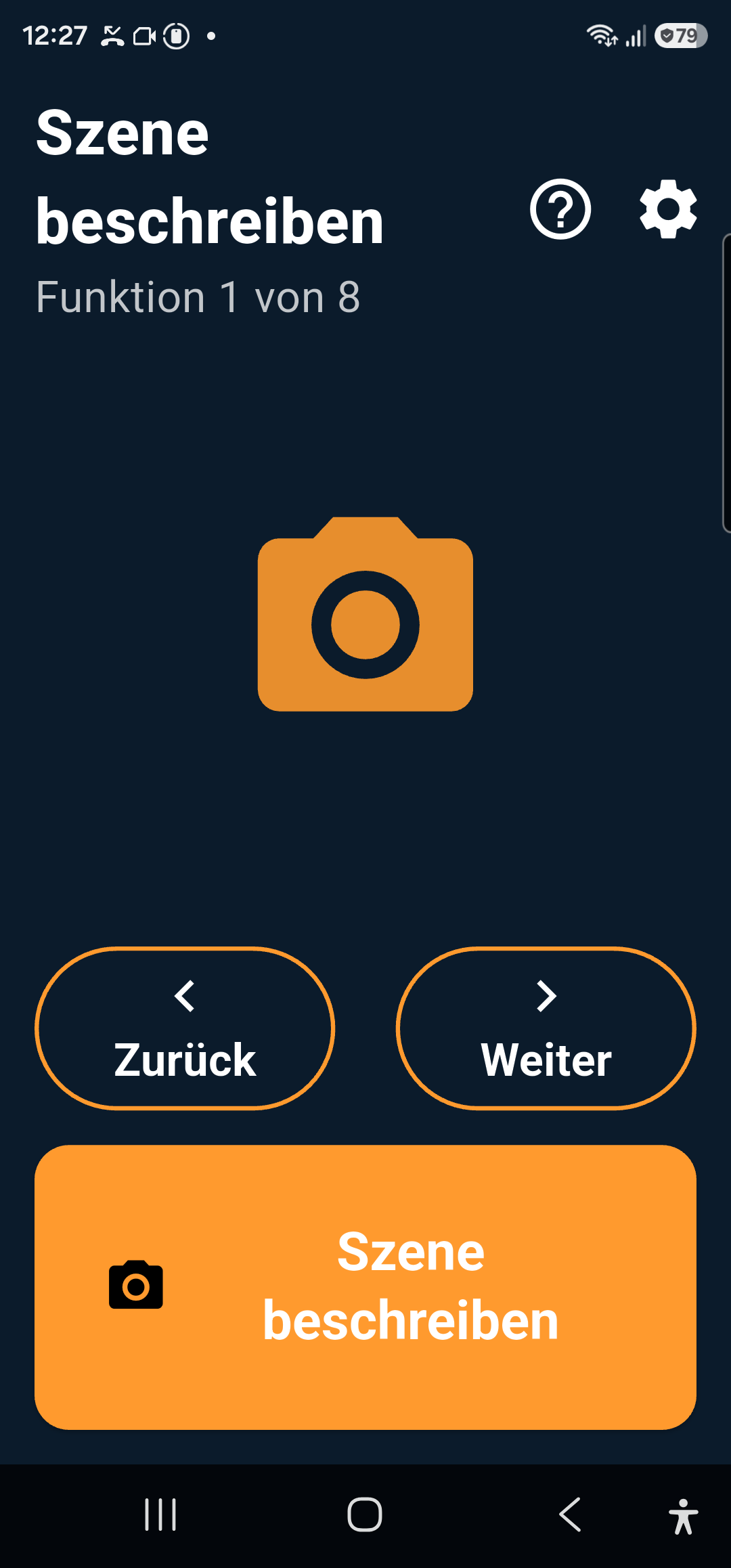
Screenshot der App 15/15 Sehen: Funktion 1 von 8 „Szene beschreiben“, großer oranger Auslöse-Knopf, Zurück/Weiter-Knöpfe. Hoher Kontrast, dunkler Hintergrund, große weiße Schrift.

Home screen “See”

App 2 · 15/15 Listening Beta

Making the surroundings visible.

Who it's for

Deaf and hard-of-hearing people. Anyone who needs subtitles or sound alerts in certain situations (doctor's appointments, restaurants, being alone at home).

What is already possible today

  • Live subtitles: everything spoken displayed in large format on the screen — stop with a single button press
  • Type → Speak: Type your response, and the phone will speak it out loud
  • Conversation transcription for reading back and sharing
  • Sound alert: detects sirens from emergency vehicles and smoke detectors on-device (YAMNet) — alarm as full-screen flash plus vibration pattern

Coming soon

  • Other sound classes: Doorbell, knocking, name calling
  • Background Watcher: Alarm even when the screen is turned off
  • V2: Cloud STT with speaker diarization, live translation, summary

Requirements

Android 13+, 6 GB RAM. Microphone permission. For live subtitles: German system language installed (included with Samsung). Noise alarm active when app is open and screen is on.

Hören-Beta in the download area ∧
Screenshot to follow.
App 3 · 15/15 Understanding Beta

From technical jargon to plain language.

Who it's for

People with dyslexia, concentration or comprehension difficulties, neurodivergence, or sensory sensitivity. Anyone who needs an official letter in plain language — or a break before the next task.

What is already possible today

  • "Calm": Breathing circle 4 seconds in/out, announcement "Inhale / Exhale"
  • Stimulus traffic light: measures the environment and shows green / yellow / red
  • "Simple Language": rule-based simplification on-device
  • Step-by-step assistant via cloud AI — optional, via switch

Coming soon

  • Plain language rewriter with local language model
  • Routine Assistant — Step-by-step instructions with photos
  • V2: High-quality official letter explainer

Requirements

Android 13+, 6 GB RAM. More RAM is helpful for the upcoming local AI — you can already test the app now.

Understanding Beta in the download area ↓
Screenshot to follow.
App 4 · 15/15 Mobility Beta

Document barriers, improve paths.

Who it's for

Wheelchair users, people using walkers or with limited mobility. Parents with strollers. Anyone who relies on smooth paths — and functioning elevators.

What is already possible today

  • Surface measurement: move/roll phone, G-sensor evaluates roughness in %
  • Announcement at the end: smooth / bumpy / very bumpy
  • Report barrier via voice note (photo + geo to follow)
  • Voice command foundation

Coming soon

  • Barrier photo + GPS + voice note bundled
  • Workaround map (OpenStreetMap) with custom and shared points
  • V2: Wheelchair Routing (OpenRouteService), Public Transport Elevator Status

Requirements

Android 13+, 6 GB RAM, GPS. A wheelchair mount is recommended — this allows the phone to accurately measure ride roughness.

Mobility Beta in the download area ↓
Screenshot to follow.
App 5 · 15/15 Seniors Beta

Calm assistant, no riddle menus.

Who it's for

Older adults struggling with technology — and the relatives who want to help from afar. Anyone for whom the "grandchild trick" or fake package/customs SMS messages cause headaches.

What is already possible today

  • Fraud Check: Simulate Message — Red / Yellow / Green Traffic Light with Reasoning
  • Send "All OK": ready-to-use text for relatives via SMS or WhatsApp
  • Magnifying glass (as in View): Zoom, Color Filter, Freeze Frame
  • XL Start — only two to three elements per screen

Coming soon

  • Technical First Aid: Photo of the device → step-by-step explanation
  • Guardian Mode: Optional live location sharing, emergency contact chain
  • V2: Phone Fraud Detection, Video First Responder

Requirements

Android 13+, 6 GB RAM. Runs on standard everyday smartphones. No account, no registration required.

Senior Beta in the download area ∉
Screenshot to follow.
App 6 · 15/15 Speaking Beta

First words without pressure.

Who it's for

Children aged 3 to 9 with language onset difficulties — including previously non-verbal children. A support tool for speech therapy, not a replacement for it. The smartphone acts as a pressure-free companion: it allows first words to emerge whenever the child is ready.

What is already possible today

  • Communication Board: Tapping speaks — even for children who (do not yet) speak
  • Words, repeating after recordings, sounds and animal noises, building sentences
  • Read Aloud: Photograph a book page, and the app reads it to you
  • Parent area with observations and reports for speech therapy sessions
  • Personalized by age and gender, adjustable stimulus intensity, German/English

Coming soon

  • School-age level: initial sounds, minimal pairs, first writing steps
  • Your own photos and parent's voice for the speech board

Requirements

Android 13+. All recordings and practice data remain on the device — nothing is uploaded.

Sprechen-Beta in the download area ↓
App 7 · 15/15 Watchdog Alpha

Is this fraud? The watchdog is keeping an eye on it.

Who it's for

For everyone who receives strange letters, SMS, or emails — built for seniors and the „grandchild setup“ by relatives, useful for everyone.

What is already possible today

  • Photograph a letter or insert text — Traffic Light Red / Yellow / Green with explanation in simple language
  • Read-aloud feature, font size slider, German / English / Turkish
  • Safety rules hardcoded: when in doubt, never green

Good to know

The watchdog uses AI online: the verified content is transferred for analysis and not stored — this is also stated in the consent during the first launch.

Coming soon

  • Share directly from WhatsApp or email — without copying
  • Android app and public beta access with access code

Currently in closed testing. Interested? Get in touch.

App 8 · 15/15 Companion Beta

Just talk.

Who it's for

Older adults who want social interaction through conversation — set up by loved ones in five minutes. No typing required: press a button, speak, listen.

What is already possible today

  • Entertainment and Knowledge & Riddles — completely via voice
  • Remembers names, family, and preferences (viewable and deletable)
  • Name, gender, and voice of the companion freely selectable
  • Eight languages, large font, signal tones and vibration adjustable
  • Runs in your browser — no installation required

Good to know

Answers are generated by AI online. The profile remains in the device's browser and can be viewed or deleted at any time in the relative/caregiver section.

Currently in family testing. Interested in beta access? Get in touch.

A quick note on installation

The Android apps are beta APKs from the password-protected download area — not a Play Store release. After downloading, open it and allow "install from unknown sources" once, then open as usual. Microphone and camera permissions will be requested upon first launch. No account, no tracking — the six 15/15 Android apps run in basic operation without the cloud. Feedback is welcome — that is exactly what it is for.

For your website

The tips widget. A button that provides immediate help.

The button at the top of this page („Accessibility tips for your device“) is a product — and you can bring it to your website. It shows your visitors the built-in features of their devices: magnifier, screen reader, contrast, dictation — for Windows, Android, iPhone/iPad, and Mac, with the most relevant tips shown first.

Thirteen languages: German, English, Turkish, French, Spanish, Italian, Polish, Russian, Ukrainian, Arabic (with right-to-left layout), Mandarin, Hindi and Japanese. The widget automatically starts in the visitor's system language — switchable directly within the window.

Accessibility within accessibility: A help window is of no use if you cannot perceive it. That is why the window itself features a large Read Aloud button (which reads the tips aloud) and an Enlarge button (text up to 175%).

Free — even for commercial sites. There is no catch and no paid version. The only "price": A small credit with my name and a link back here will remain at the bottom of the window. That is my marketing effect — and your good karma point for spreading the word.

And now for the no-bullshit part: This widget does NOT make your website accessible. It is intentionally the opposite of "overlay" tools that promise compliance but fail to deliver. It does not change your site, tracks nothing, loads no additional content, and sets no cookies — it only helps your visitors. True accessibility is a craft; I am happy to provide personal assistance with it.

Integrate — one line, done

<script src="https://cdn.jsdelivr.net/gh/spm231177-coder/[email protected]/nb-tipps.js" defer></script>

The line goes before the closing your site — in WordPress, for example, via a footer code area or a snippet plugin. The button appears in the bottom left. That was the entire installation.

Customize — via data attribute

data-lang Start language: auto (Default) or de, en, tr, fr, es, it, pl, ru, uk, ar, zh, hi, ja
data-position bottom-left (Default), bottom-right or inline — inline places the button exactly at the position of the script tag
data-color Your brand color (Hex or CSS variable). The button text color will automatically adjust to a readable contrast.
data-label Custom button text instead of the standard label

Example — bottom right, English, in brand color

<script src="https://cdn.jsdelivr.net/gh/spm231177-coder/[email protected]/nb-tipps.js" defer
        data-position="bottom-right" data-lang="en" data-color="#7c3aed"></script>

Open Source (MIT). Der ganze Code liegt offen auf GitHub — du kannst selbst nachlesen, dass nichts getrackt und nichts nachgeladen wird. Lieber selbst hosten? Datei herunterladen, auf den eigenen Server legen, src adjust, and you're done. No dependencies, no build.

Auf GitHub ansehen & herunterladen ↗ Special request (own language, own tips)? Contact us

Das Widget ist gratis und bleibt es. Wenn es dir hilft, freue ich mich über einen Kaffee: paypal.me/saschapaulmanke

The 15/15 Vision

15 percent of people. 15 target groups. An AI ecosystem that thinks along.

About 15 percent of people live with a disability. Vision, hearing, motor skills, cognition, neurodivergence, sensory sensitivity, age, language. Most digital products are designed without them. So are AI models. And then, in the end, a accessibility mode is added that helps little and annoys everyone.

15/15 reverses this: Native-User-First Inclusive AI. The affected users are not tested at the end, but are involved from day one — as personas, as real testers, and as data providers. Alongside usage, a second product emerges: a real-time data layer regarding actual barriers in both the physical and digital worlds. Where is the elevator broken? Which forms are illegible? Where are the systemic bottlenecks? This is licensable — for transit companies, cities, operators, and authorities.

Specifically planned: a 90-day pilot in Frankfurt am Main. With a core team of 15 people, at least half of whom are personally affected. Test area: a manageable zone in the city center or a public transport corridor. Goal: to empirically demonstrate the value of the data layer — and to harden two to three core apps under real-world conditions.

What I would do with the right partner

A pilot setup with a robust framework — no innovation lab theater. Core topics: serious persona simulation in design, real testers from the very first click, cleanly licensed data layer, clear boundaries between on-device and cloud. For partners such as municipal transport companies, city administrations, social enterprises, or a corporation with serious BFSG requirements instead of mere marketing stickers.

Talk about 15/15 →
What I offer companies

Accessibility — from video production to AI processes.

Accessible Videos & Content

WCAG-compliant videos with subtitles, audio description, and easy language. Update existing content or produce it correctly from scratch.

BFSG Consulting & Implementation

Status analysis, prioritized action plan, and implementation support. No audit dread — clear steps, concrete results.

AI processes for accessibility

Alt text, plain language, subtitles — automated within the content workflow. I build the processes and train the team.

BFSG in brief

Since June 2025, digital products and services must be provided in an accessible manner for companies with at least 10 employees or €2 million in revenue. Fines of up to €100,000, warning notices from consumer protection agencies, and exclusion from public tenders.

Check my impact →
Personal

Why this is more than just a project to me.

I have had poor vision since childhood. Not so poor that I am unable to work — but bad enough to notice every day where digital products fail to reach their target audience. Small buttons, low contrast, icon puzzles without labels, videos without subtitles, forms without structure. Most of the time, this isn't out of malice — but because no one on the team was affected by it.

At the same time, over the last few years, I have experienced just how much AI is truly capable of today. I started the 15/15 idea when I realized how much of it runs on a regular smartphone — without expensive glasses, without a subscription, and without being forced to use the cloud. And how much sense it makes to take the whole from the users' perspective to build, not from that of a corporate product manager.

What you see here is a work in progress. Not a finished product, not a pitch presentation. I work openly, documenting both progress and setbacks, and sharing the apps for you to try out. If you can relate to this topic — as someone affected, as a relative, as a professional, or as a company —: please get in touch. I am very easy to reach.

— Sascha Manke, Frankfurt am Main

Get in touch [email protected] 069 47869700